
How to archive, reactivate, or delete a sales channel
Why this matters
Sales networks change. Agencies leave, stores close, and a channel you set up for a pilot never went live. You need a way to take those channels out of circulation without losing the reward history attached to them.
There are two ways to do that, and they are not interchangeable:
- Archive retires a channel while keeping everything it ever did. Use this in almost every real situation.
- Delete removes a channel permanently. It is only available for channels that were never used for anything, which makes it a cleanup tool rather than a retirement tool.
The two are never offered together. Which one you see, if either, depends on what the channel is currently tied to.
Our example Insurance Co. ends its contract with one broker agency. That agency generated 200 referrals last year, all of which need to stay in the reporting. Insurance Co. archives the channel. Separately, a duplicate agency channel created by mistake last week has never seen a sale, so that one gets deleted.
Archive a channel
Archiving takes a channel out of active use. Its history stays intact, and you can bring it back later.
- Navigate to Sales Channels. Open Manage > Sales Channels and find the channel.
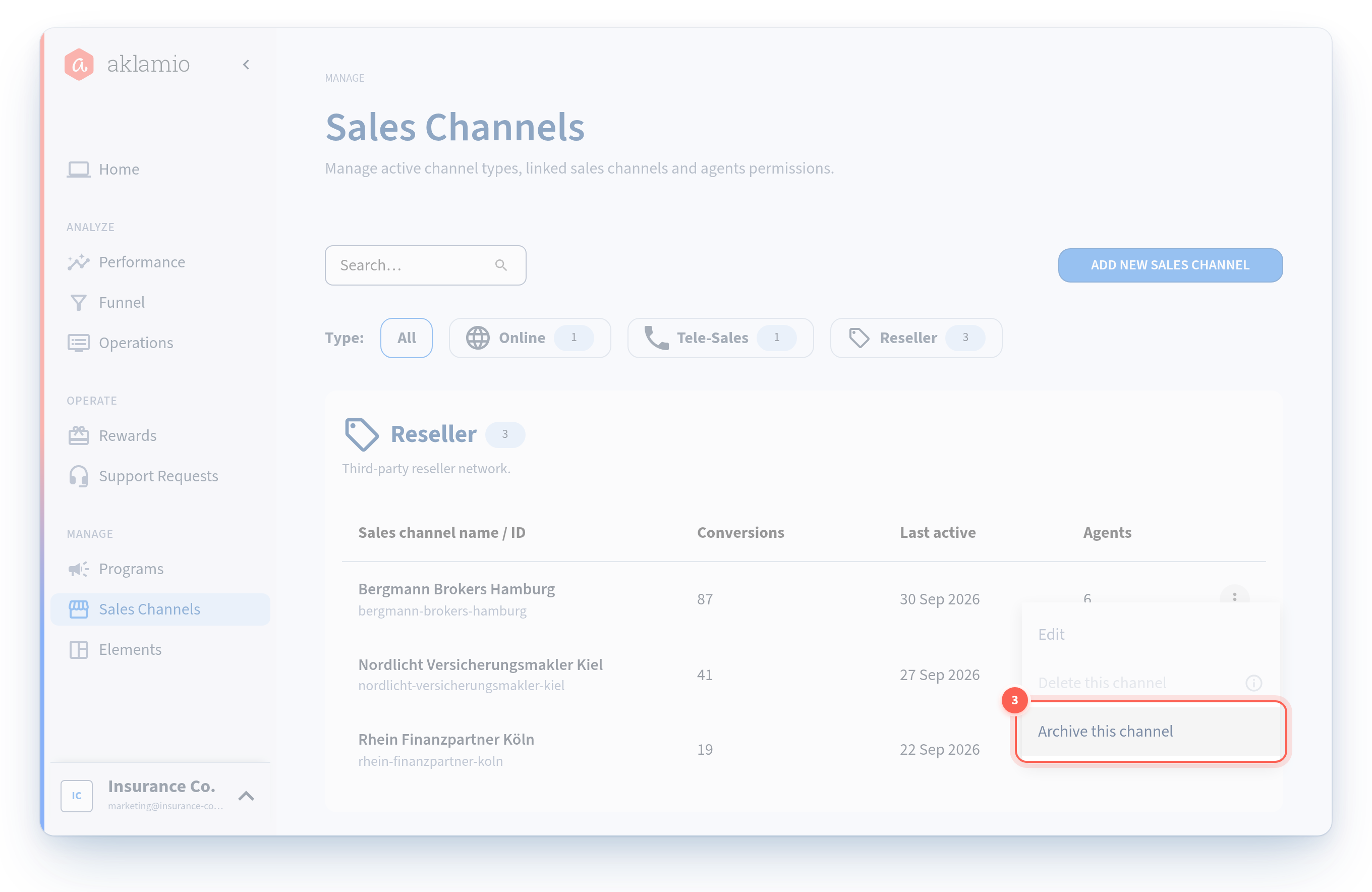
- Open the actions menu at the end of the channel's row.
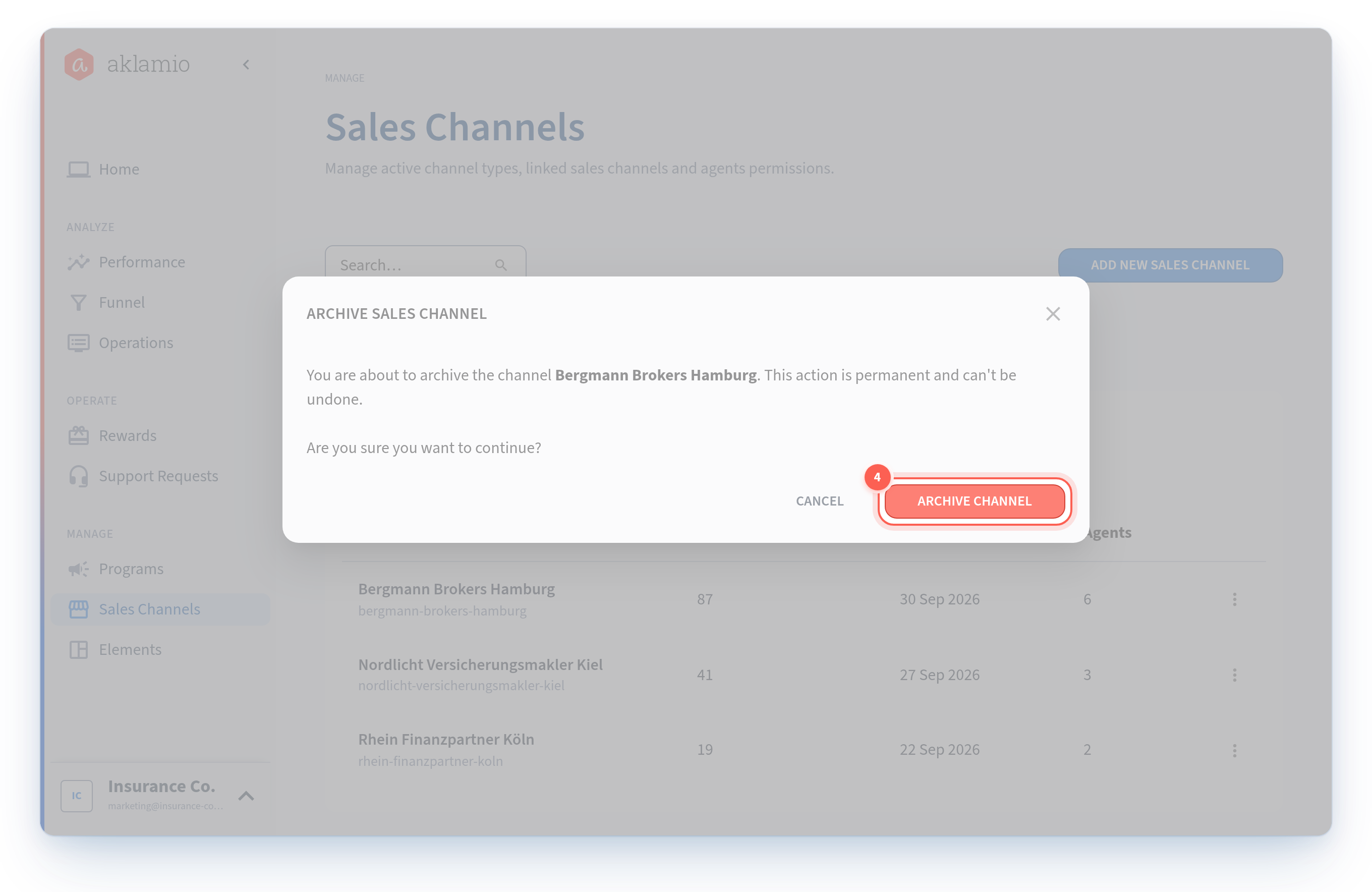
- Select Archive. A confirmation dialog explains what will happen.
- Confirm. The channel moves out of your active channels and can no longer be selected in program configuration.
What archiving does
- The channel is removed from every program that included it. Not hidden, removed. This happens as part of the archive itself.
- Reactivating does not put it back. If you later reactivate the channel, you have to add it to each program again by hand.
- Reward rules keep their reference to it. Rules are not rewritten. But because the channel is no longer in the program, the rule cannot match new sales through it.
- Historical sales and rewards are untouched. Everything that already happened stays exactly as it is, and stays in your reporting.
- Agent access is preserved but suspended. Backoffice assignments and agent permissions for the channel are not deleted, so they are still there if the channel returns. They stay unavailable until the channel is included in the program again, which reactivating on its own does not do.
When archive is blocked
You cannot archive a channel that a current or scheduled rule plan uses. The platform tells you which rule plan is in the way. End or retarget that rule plan first, then archive.
Past activity never blocks archiving. A channel with ten years of sales behind it archives fine.
Reactivate a channel
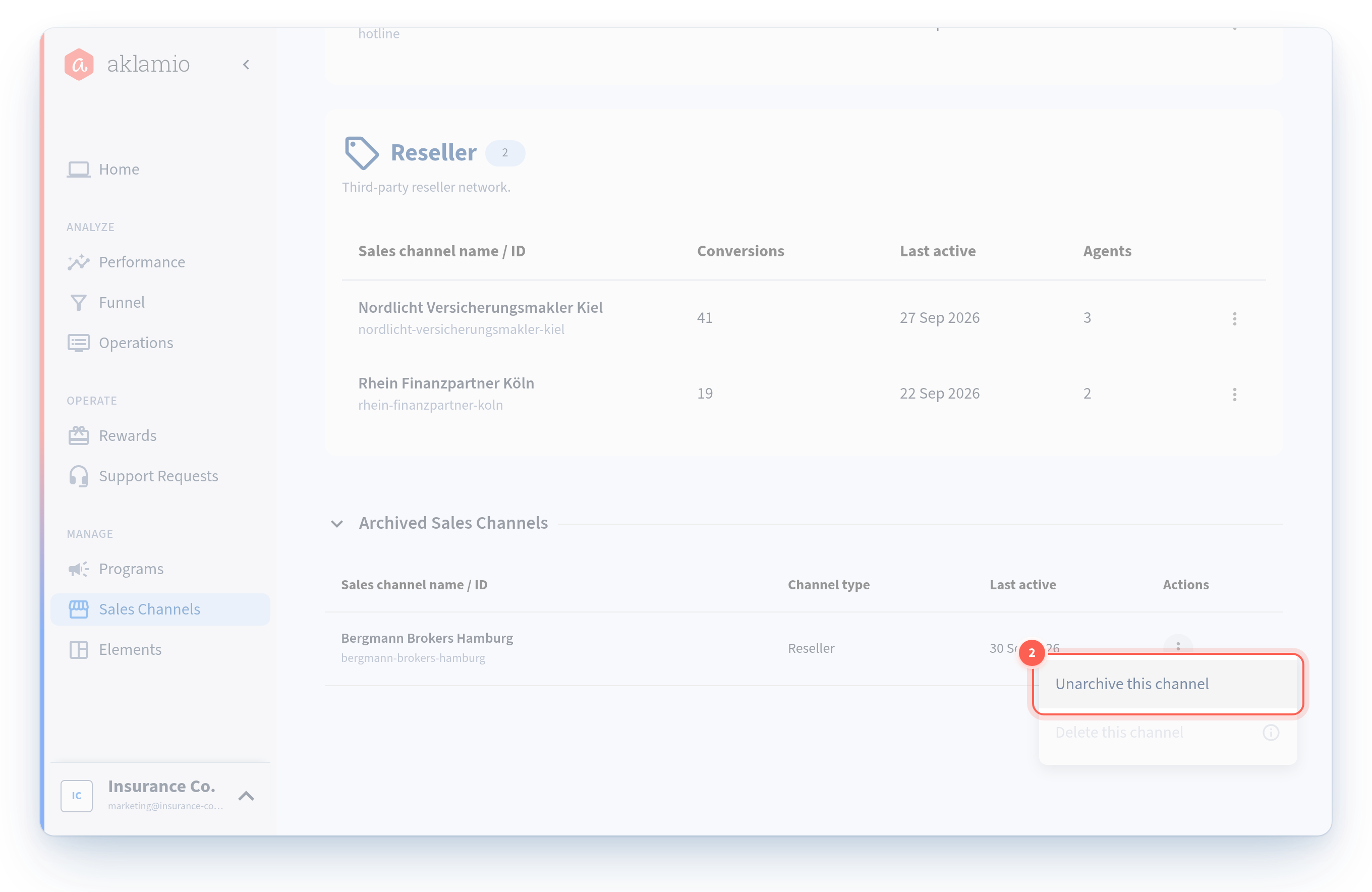
- Navigate to Sales Channels and find the archived channel. Archived channels stay manageable on this page.
- Open the actions menu and select Unarchive.
- Add the channel back to your programs. This is the step people miss. Reactivating restores the channel itself, not its program memberships. Open each program's sales channel settings and include it again. See How to add sales channels to a program and set your main channels.
- Check its main channel status and reward rules. If it was a main channel before, set it again. Confirm at least one reward rule targets it, or it will earn nothing.
Delete a channel
Deleting is permanent. It is only available for a channel with nothing attached to it.
A channel can be deleted only when all three of these are true:
- it is not included in any program;
- no current or scheduled rule plan uses it; and
- no sales have ever been recorded against it.
If any one of those fails, Delete is not offered. In most of those cases Archive is what you want instead, but note that a channel used by a current or scheduled rule plan is blocked from both actions. Deal with the rule plan first and Archive becomes available.
- Navigate to Sales Channels and find the channel.
- Open the actions menu. If Delete appears, the channel is safe to remove.
- Select Delete and confirm. The channel is gone permanently.
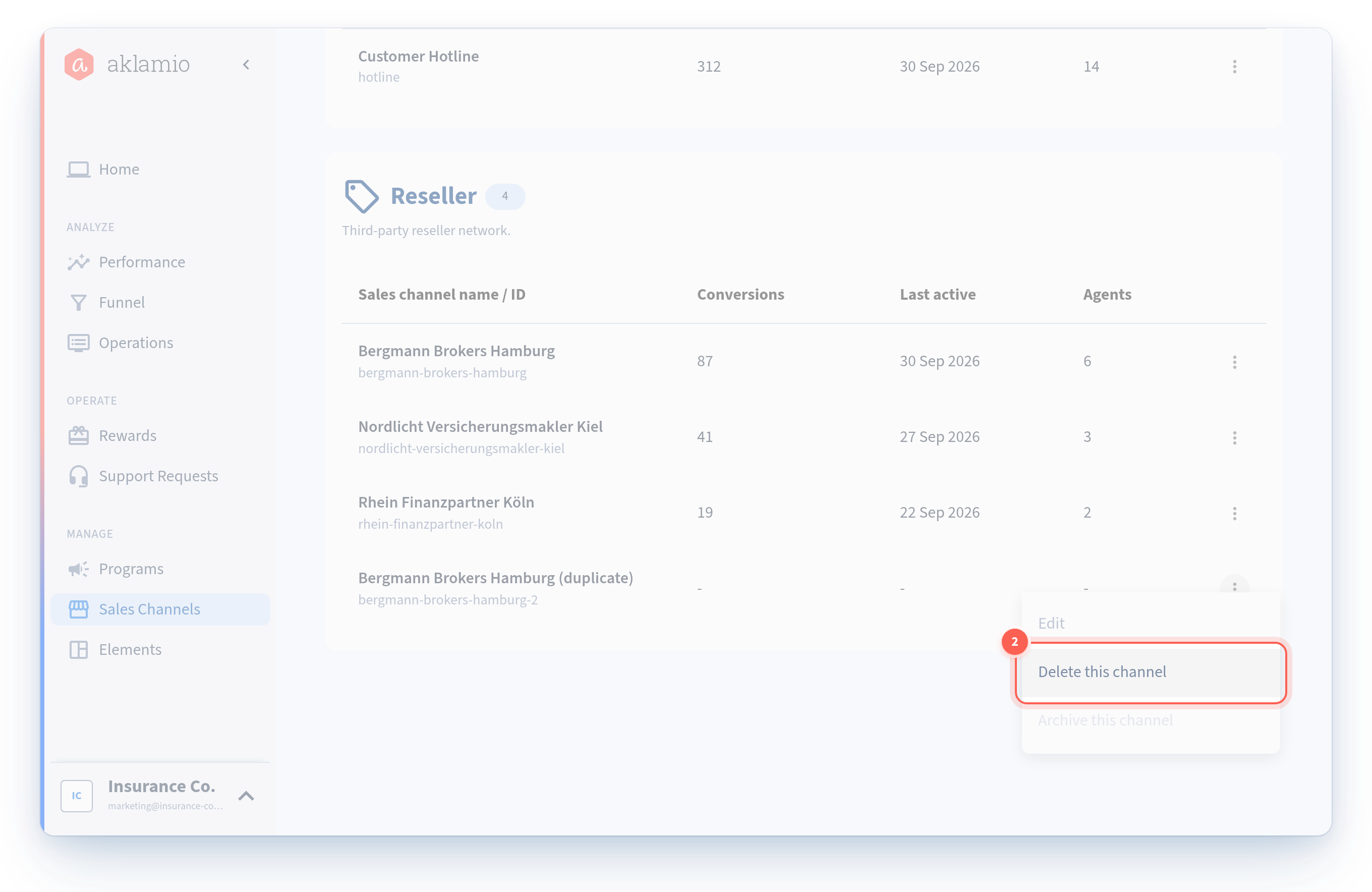
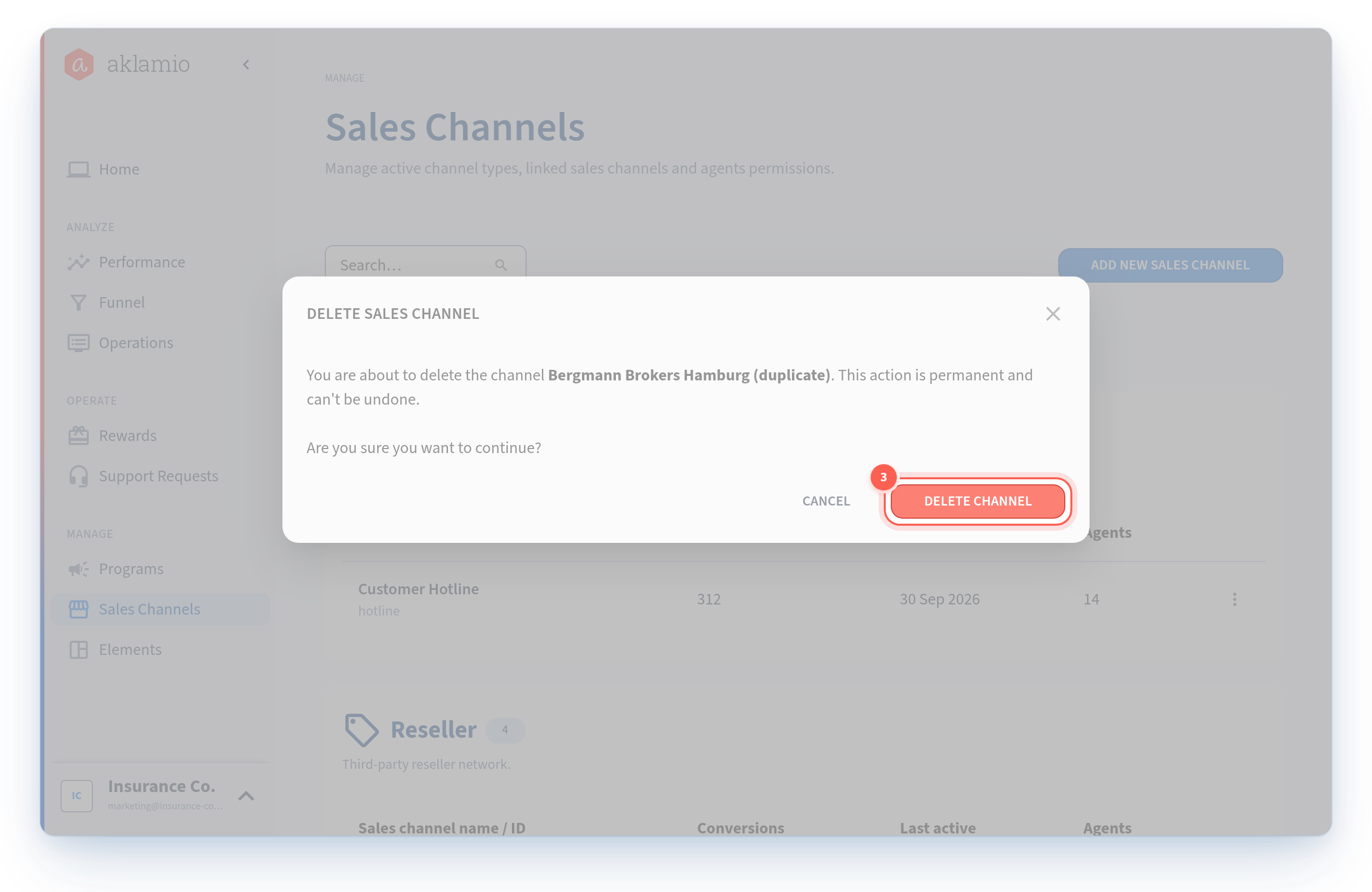
If Delete is not in the menu, the channel has history, program membership, or a rule plan attached. That is the platform protecting your reporting, not a permissions problem.
Archive or delete: which one
Situation | Action |
|---|---|
An agency you worked with has ended the contract | Archive |
A store has closed | Archive |
A channel with any sales history at all | Archive (delete is not available) |
A duplicate created by mistake, never used | Delete |
A channel set up for a pilot that never launched | Delete |
A channel you might reopen next season | Archive |
The short version: if it ever generated a sale, archive it. Delete exists for tidying up mistakes.
Remove a channel from one program instead
Archiving is a brand-level action. If you only want a channel out of one program while it keeps running elsewhere, exclude it in that program's sales channel settings instead.
A channel cannot be excluded from a program while a current or scheduled rule plan targets it, while a Backoffice is assigned to it, or while an agent holds a direct permission for it. Past sales alone do not block removal. The message names which of the three applies.
💡 Best practices
- Retarget rules first. An active rule blocks the archive, so handling the rule plan first turns a two-step problem into one clean action.
- Archive, do not delete, anything with history. The platform enforces this, but knowing it up front saves you looking for a Delete option that will never appear.
- Do a catalog review each quarter. Networks accumulate channels. A short pass to archive what is no longer selling keeps your filters and reports readable.
- Do not archive to hide a channel from customers. Removing it as a main channel in the program does that, without touching anything else.
🔧 Troubleshooting
Archive is not available on this channel. A current or scheduled rule plan uses it. The message names the rule plan. End or retarget it, then archive.
Neither Archive nor Delete is available. A current or scheduled rule plan blocks both. Retarget or end it, and Archive becomes available.
Delete is not available on this channel. The channel is included in a program, used by a rule plan, or has historical sales. Any one of these makes delete unavailable by design, because deleting would break your reporting. Archive instead.
I reactivated a channel and it is still not in my programs. That is expected. Archiving removes the channel from every program, and reactivating does not restore those memberships. Add it back in each program's sales channel settings.
My agents lost a Backoffice after I archived a channel. Their permissions were not deleted, but a Backoffice only appears when its channel is included in the program. Reactivate the channel and add it back to the program to restore access.
Sales are still showing for a channel I archived. Historical sales are preserved deliberately and continue to appear in reporting. New sales should not be attributed to an archived channel. If they are, check whether an integration is still sending that channel's identifier and whether it was re-included in a program.
Do I need to retarget my reward rules before archiving? Only the ones that are current or scheduled, and only because they block the archive. Rules keep their reference to an archived channel rather than being rewritten, so nothing is lost.
🔗 Related articles
- How to create and manage your sales channels
- How to add sales channels to a program and set your main channels
- How to target reward rules at specific sales channels
- How to set up customer-facing content for a sales channel